
What if you could write your novel with your characters, places, timelines, research and story threads right beside you? Meet The Desk, a manuscript-writing environment built by an independent author, and Inky, the Keeper of Lost Threads.
There is something wonderfully frustrating about writing a novel.
You can spend hours creating an imaginary world, filling it with complicated characters, mysterious locations, forgotten histories and carefully concealed clues.
And then, halfway through an important scene, you suddenly realise you've forgotten something.
Was that character's hair brown or black?
What happened on the evening of the murder?
Where did I put the research about that old Scottish manor?
And whatever happened to the story thread I introduced six chapters ago?
There goes the writing.
Instead of following the scene unfolding in your imagination, you're searching through folders, opening documents and trying to remember where you stored the information.
I know that frustration very well.
It's one of the reasons I created StoryLedger.
And now I'd like to introduce you to two things that have made my writing life rather more enjoyable.
The Desk, where I write my novels.
And Inky, the Keeper of Lost Threads.
But first, let me show you what writing inside StoryLedger actually looks like.
Watch: Writing With Your Story Beside You
In this short demonstration, I take you inside StoryLedger and show how The Desk brings manuscript writing and story planning together.
You'll see how I work with chapters and scenes, consult story records, capture important threads and keep the details of my fictional world within reach.
And you'll meet a rather unusual little assistant.


StoryLedger — The Desk: Write With Your Story Beside You. Featuring Inky, the Keeper of Lost Threads.
I Didn't Want Another Place to Store My Writing
When I began developing StoryLedger, I wasn't looking for another complicated application to learn.
I was looking for a way to stop interrupting myself.
As an independent author of Scottish Gothic ghost mysteries, I write stories that frequently involve recurring characters, historical events, complicated relationships and secrets that may remain unresolved across several novels.
My fictional world has grown considerably over the years.
So has the information I need to remember.
For a long time, I kept research in folders, character descriptions in documents, plot notes elsewhere and timelines wherever I thought I'd remember to find them.
It worked, until it didn't.
The problem wasn't that I had too little information.
I had too much information scattered across too many places.
Every time I needed to check something, I had to leave the manuscript.
And every interruption meant losing a little of the momentum that makes writing enjoyable.
Eventually, I asked myself a simple question.
Why can't I write my novel with the information I need beside me?
That question helped shape The Desk.
The Desk: A Place to Write, Not Just Plan
The Desk is StoryLedger's built-in manuscript-writing environment.
I can organise my novel into chapters and scenes, work directly on the manuscript and consult the information I've recorded about my story.
The layout is designed around the way I write.
My chapters and scenes are available in a navigation panel.
My manuscript occupies the main writing area.
And the details of my fictional world can appear alongside the text.
That last part is particularly important.
I don't want to abandon a scene because I've forgotten a character's eye colour or need to check when an event occurred.
I want to keep writing.
With The Desk, those records are part of the same working environment.
And because StoryLedger is a Windows desktop application, I can work locally with my manuscript and story information on my own computer.
Records Beside Me: My Fictional World Within Reach
One of my favourite features is called Records Beside Me.
It brings relevant information from my story records into view while I'm writing.
For example, imagine I'm writing a scene involving a character who first appeared several novels earlier.
I've already recorded that character's description, appearance, relationships and important details.
When StoryLedger recognises a recorded name in my manuscript, it can bring the associated information into the reference panel.
I can check the details without searching through another document.
The same principle applies to recorded places and timeline events.
That is especially useful when writing an interconnected series.
A location may have appeared in an earlier novel.
A character may have witnessed something important years before.
A seemingly minor historical detail may suddenly become relevant to the mystery.
Instead of relying entirely on memory, I can consult the information I've already recorded.
StoryLedger doesn't invent these details for me.
It uses the records I've created.
My imagination creates the fictional world. StoryLedger helps me remember it.
What Happens When You Discover Another Story Thread?
Writers have a peculiar habit of discovering new ideas while working on something else.
You might be writing a conversation when a character mentions an old family secret.
Suddenly, you realise that secret could become important later.
Perhaps it connects to another character.
Perhaps it explains something that happened three chapters earlier.
Or perhaps it will become the clue that finally unravels the mystery.
You don't necessarily want to stop writing and develop the entire idea immediately.
But you certainly don't want to forget it.
In the video, I demonstrate StoryLedger's Capture Thread feature.
It's a way to capture an important story detail while working in The Desk, so that it can become part of the information I'm tracking.
For a mystery writer, that's particularly useful.
Stories are full of threads.
Some are introduced deliberately.
Others emerge unexpectedly as the characters and plot develop.
And some become important only when you're approaching the ending.
Keeping track of those threads is one of the challenges that originally inspired StoryLedger.
Which brings me to someone I'd like you to meet.
Meet Inky, the Keeper of Lost Threads
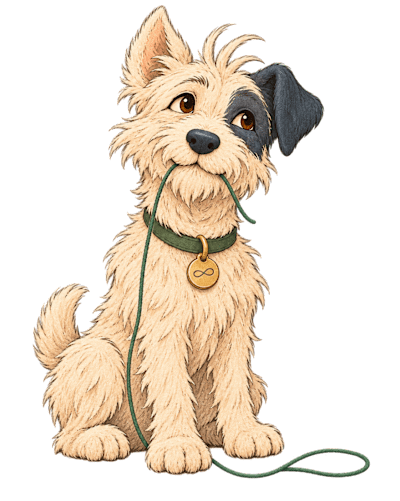
This is Inky.
Inky is StoryLedger's new brand ambassador, and rather an unusual little creature.
With scruffy cream-coloured fur, one upright ear, one floppy black ear, a distinctive dark patch around one eye and a small gold infinity medallion, Inky has a rather innocent appearance.
Don't be fooled.
That green thread dangling from Inky's mouth is no ordinary piece of string.
Inky is the Keeper of Lost Threads.
And somewhere beyond the pages of our manuscripts lies a mysterious place called The Unwritten.
It's where Inky retrieves the things that writers have misplaced, forgotten or abandoned.
A missing clue.
An unfinished idea.
A character detail that suddenly becomes important.
A story thread waiting to be rediscovered.
And when Inky returns with something precious, there is only one thing to say.
“Found this. Thought you might want it back.”
I rather like that.
Because it's precisely the feeling I wanted StoryLedger to give me.
Not a machine telling me what to write.
Not an application inventing stories on my behalf.
Just a helpful companion bringing the details of my own fictional world back into view.
Of course, Inky is a fictional character, and The Unwritten is part of the little world I'm creating around StoryLedger.
But the problem Inky represents is very real.
Every novelist knows what it's like to lose a thread.
And every novelist knows the satisfaction of finding it again.
A Writing Environment That Respects the Author
When I designed The Desk, I wanted the software to support my writing process without taking over.
That includes practical tools such as spelling checks, language support and custom style sheets.
I can maintain my preferred writing conventions, work with unusual character names and keep important terminology consistent.
I can also consult character records, locations, timelines and other story information without constantly switching applications.
But there's something StoryLedger deliberately doesn't do.
It doesn't write my novels for me.
StoryLedger has no AI writing engine.
It doesn't generate characters, invent plot twists or automatically rewrite my manuscript.
Those decisions belong to me.
As an author, that's exactly how I want it.
I enjoy creating my fictional worlds.
I enjoy the unexpected conversations between characters.
And I enjoy the moment when a mystery suddenly reveals a solution I hadn't anticipated.
I don't want software to replace those experiences.
I want software that makes it easier to concentrate on them.
What About Continuity Errors?
Writing the manuscript is only part of the process.
Eventually, the story reaches the editing stage.
And that's when some rather embarrassing inconsistencies can emerge.
A character's appearance changes.
A timeline event occurs on the wrong date.
Somebody knows something they couldn't possibly have known.
Or a clue is mentioned long before it was discovered.
I've encountered these problems in my own writing.
StoryLedger allows me to record continuity issues, associate them with relevant story information and track their resolution.
Within The Desk, I can navigate to a recorded issue, locate the relevant passage and work on the correction.
I can then update the issue's status as part of the editing process.
It's a far more manageable approach than keeping a separate list of corrections and repeatedly searching the manuscript.
And when the manuscript is ready for my editor, I can export it alongside a Story Bible containing the information I've recorded about the fictional world.
That gives us a common reference for characters, places, timelines and other important details.
It doesn't eliminate the need for professional editing.
But it helps me arrive at that stage better organised.
Why This Matters While Writing My Next Novel
I'm currently working on a particularly ambitious project.
After writing interconnected novels across The McTavish Chronicles and The Highlands University of Ghostology, I'm bringing those fictional worlds together for one final conclusion.
That means revisiting characters, relationships, locations and story threads established across multiple books.
And I want those details to remain consistent.
I also want the ending to feel satisfying.
When readers have followed characters through so many adventures, they deserve a conclusion that respects the stories that came before it.
That's a considerable responsibility.
Fortunately, I no longer have to keep every detail in my head.
I write in The Desk.
My story records are beside me.
My threads are tracked.
And when something needs checking, I know where to look.
It's difficult to describe how much more enjoyable that makes the process.
I'm spending less time hunting through folders and more time doing what I actually love.
Writing stories.
StoryLedger Was Built for the Way I Write
I didn't begin developing StoryLedger because I wanted to compete with every writing application on the market.
I built it because I couldn't find a tool that met my own requirements.
I needed to manage characters and their appearances.
I needed to track places, relationships, clues and story threads.
I needed timelines, research records and continuity tracking.
And eventually, I needed somewhere to write the manuscript itself.
That's how The Desk became such an important part of StoryLedger.
Today, it's where I do my writing.
And now, with Inky joining the family, I have a rather charming reminder of why I started this project in the first place.
Because writers lose things.
Not necessarily their imagination.
Sometimes just the small details that make an imaginary world believable.
And when those details go missing, it's nice to have someone who knows where to look.
“Found this. Thought you might want it back.”
Welcome to StoryLedger, Inky.
I suspect we're going to have some wonderful adventures together.
Discover StoryLedger and The Desk
StoryLedger is a Windows desktop application for fiction authors who want to plan, write and organise their novels in one connected environment.
It brings together manuscript writing, character records, places, timelines, research, story threads and continuity management.
And The Desk lets you write with your fictional world beside you.
A 30-day free trial is available.
Discover StoryLedger:
https://blurbcraftstudio.com/storyledger.html
Read more about writing and continuity with StoryLedger:
https://iwanross.com/blog/how-do-you-spot-inconsistencies-in-a-story-timeline-writing-my-next-novel
Every dark cloud has a StoryLedger.
Iwan Ross is an independent author of Scottish Gothic ghost mysteries and supernatural suspense, and the creator of StoryLedger.